Pages

Showing posts with label planning. Show all posts

Saturday, January 24, 2026

String Fest Timeline for Planning


String Fest is a huge undertaking.  It involves ALL the district's orchestra students and teachers, from elementary through high school.  Each grade level prepares a piece of their own to perform at the String Fest evening concert, and then everyone prepares the same multi-level grand finale piece.  There is a field trip to the high school's field house during the day where each group gets their own rehearsal time and then the combined groups get a combined rehearsal in the afternoon followed by the evening concert for families.  It is a great opportunity to build community and for elementary orchestra students to see and hear the older students and to envision themselves as one day performing as part of the high school orchestras.  String Fest used to be in May, but when signing up for middle school electives got moved up to mid-January, we began scheduling String Fest at the end of January to help serve as a retention tool.

Planning for this one-day event begins the previous spring with scheduling the date and continues throughout the fall and early winter with a lot of collaboration between all the orchestra teachers.  The district that I attended as a student did not have an event like this, so I had a lot to learn when I began teaching in a district that has a tradition of an annual String Fest.  To keep track of everything that needed to be done, I created a timeline for planning.  There is so much that needs to happen behind the scenes in order for the day to run smoothly and can be overwhelming.

Please check with your admin/school/district for procedures and policies (like scheduling dates, reserving rooms, permission slip forms, how to handle student meds on a field trip, etc.), but here is the guide I created to help myself not to forget any of the details from year to year along.  It also includes links to some supporting documents and blog posts:


I'm sure I'll be adding more at some point, but here's a start towards planning a district-wide String Fest.  What else would you like to know?  Or, what additional resources would be helpful to see?  Happy planning!


Wednesday, August 27, 2025

Zooming Out: Resources for the Entire School Year


Sometimes it is helpful to zoom out and look at the entire school year for planning purposes.  Here is a collection of resources/blog posts with the whole school year in mind:


Check out the Contents page for a list of all my blog posts, organized by category.


For context, I teach first- and second-year orchestra students at two elementary schools.


Sunday, August 17, 2025

Bulletin Board Ideas by Month


I keep a document where I keep track which years/months I post my different hallway bulletin boards, and I thought it might be helpful to see them sorted by month.  My beginning-of-the-year bulletin board tends to stay up until winter break if it's a year when I don't put up the bow hold bulletin board; then second semester I'll change it each month or so.  Some I use every year (Birthday/Music for Life/Music In Our Schools Month/End-of-Year Recruiting), some I alternate every-other year (the two January bulletin boards), some I try to rotate between several before repeating one (beginning-of-the-year bulletin boards), and some I've maybe only used once or twice.


What other bulletin board ideas might I add to the mix?


SEPTEMBER/BEGINNING OF THE YEAR/SEMESTER 1


OCTOBER


NOVEMBER


DECEMBER/WINTER CONCERT


JANUARY


FEBRUARY


MARCH


APRIL


MAY/JUNE/END OF YEAR


ANY TIME (or could be timed to special events--Career Day?)


YEAR-ROUND (in classroom)


Friday, August 1, 2025

Elementary Orchestra Repertoire Options by Unit/Concert


I have been wanting another way to look at the repertoire I have taught in past years, organized by unit or by concert.  I had always been keeping track of past repertoire, but it was just a long list in a Google Doc format, and I would have to scan through the whole thing (or do Ctr + F to find a specific piece) each time I was looking for something.  This new document groups pieces by unit--during which part of the year this piece could be taught or for which concert it could be performed.

There are so many pieces out there for beginning orchestra, but for it to work in my teaching situation, it would have to fit in a specific slot depending on what has been taught by that time in the year and it would have to help provide a balance between different time periods, styles, parts of the world, composers, etc. that students are studying throughout the course of the year.  Please see this blog post for a sample winter concert and spring concert program for first- and second-year orchestra students along with a list and explanation of the different "slots" I try to fill with my repertoire selections.  

In my district, we have a winter band/orchestra/choir concert in December, our district-wide String Fest field trip and concert at the end of January, and a spring band/orchestra/choir concert in May.  In February, once String Fest is over and we are into our Solo/Ensemble unit, beginners will start their first very simple full orchestra piece (often just two parts), while second-year students will learn a full orchestra piece that may or may not be performed on the spring concert--students will get to vote from a few options they've been studying later in the year.

Anyway, I went ahead and created a Google Sheet, organized more-or-less chronologically through the school year, with both first-year (5th grade) and second-year (6th grade) orchestra represented.  Titles in each category are listed in alphabetical order, with links to the publisher's website (or to a different blog post for my arrangements).  The last column allows me to track when I've last taught each piece too.  

As always, feel free to make a copy and update as you like!  Which other pieces would you recommend I check out?


Sunday, July 27, 2025

Lesson Plan Overviews and Agenda by Week


I wanted to share sample lesson plans + agendas + resources for the entire school year.  To view, here's the link:


You'll see the year organized by week, with 5th grade (first-year orchestra) on the left and 6th grade (second-year orchestra) on the right.  The blue week number in the first column is a link to that week's lesson plan, and the image of the agenda/white board in the second column is a link to the Google Drawing.  Feel free to make a copy of either and then edit them for yourself.  The fourth column lists links to corresponding blog posts.

Then, the link below is more specific lesson plans for each week, including full orchestra rehearsals too--not just small groups.  Because the repertoire changes each year, I called pieces things like [String Fest Piece #1], [String Fest Piece #2], or [Spring #1] with pretty broad lesson plans for those. (Please see this post for different repertoire options)

In my district, orchestra begins in 5th grade with 30 minutes of small-group learning once a week and 30 minutes of full orchestra once a week.  (6th grade is still elementary school in my district.)  The school year begins just after Labor Day and ends the first or second week in June.  The first week of school for me is spent recruiting and finalizing rosters and creating the first small group rotation schedule (most students will have signed up the previous spring), so small groups begin the second week of school, hence 35 weeks of lesson plans.  Full orchestra rehearsals begin the third week of small groups (so the fourth week of school, about the last week of September).  For performances, we have a winter concert in early December, a district-wide String Fest field trip and concert the end of January (right as the second semester is starting), an elementary orchestra Solo/Ensemble festival in March, and then a spring concert in early-to-mid May.  Orchestra Expressions is the method book we've used for several years, and then I have different supplements and composition worksheets and other resources that I've created as well.  I hope seeing the school year mapped out in this format with one orchestra teacher's plans helps with both long-term planning and individual lesson plans!


Tuesday, March 25, 2025

Weekly Newsletters


Students at my schools have one 30-minute small group and one 30-minute full orchestra rehearsal each week, and I like to send a weekly newsletter to families to keep everyone up-to-date.  I include a summary of what we did that week, the practice assignment, the link to the small group schedule, and any concert info/reminders of important dates.

I used to just write an email each week (with lots of copy/pasting from the previous year's weekly email), but it was only text.  At some point I switched to Google Slides, and I like this format much better.  Each week fits on one slide, and I can include buttons with links to the schedule, concerts in the area, music advocacy resources, and more.  It's easy to add pictures and text boxes and to move things around to make it look just the way I want. (For any students who are flagged "No media release" on Infinite Campus, I do check in with those families to see if it's okay that I include pictures of their student in the newsletter and that has not been a problem.)  Families really like seeing pictures of their students in the newsletter, and I'm hoping that including more pictures makes it more likely for families to read the other information that I include as well :)  The document is set to "Anyone with the link can view," and then I include the link in the weekly email to families.

Instead of starting from scratch each week, I have a tab open with the previous year's newsletter and simply copy/paste the corresponding slide into the top of this year's document and update as needed.  Now the weekly newsletters are all contained in one document, and it's easy to scroll down to previous weeks.  I change the background color each week, so you see a nice rainbow effect as you scroll through the school year.  Any extra slides with concert info or Solo/Ensemble info etc. have a white background so they stand out.

My weekly email is basically:


Happy Tuesday orchestra families!

Please check out our weekly orchestra newsletter to find out what we did in orchestra this week!


(I highlight "weekly orchestra newsletter," hit "Control K," and then copy/paste the newsletter link to turn the text into a link.)

I'll also include concert into or other important info in the body of the email for those who don't click on the link.  I cc my administrators and bcc parent/guardian emails and then "schedule send" the email for the end of the school day.


Here are templates of an entire school year's worth of slides.  Feel free to make a copy and modify as you like!


Weekly newsletter template


Notes: Along the top where it says the week number, I also include the school and grade level, since I teach at multiple schools and want to keep it organized for myself.  I've also removed all the links but kept the text blue to see where I would generally include one.


Sunday, March 23, 2025

Elementary Orchestra Solo/Ensemble, Part 4: Festival Day!


Leading up to our elementary orchestra Solo/Ensemble festival, my coworker and I are as prepared as we can be.  The schedules have been shared with students and families; folders for the adjudicators have been stuffed with the room schedule, rubrics (color-coded by elementary school and then put in order by time slot), extra blank rubrics in the back, judges copies (for the most part Orchestra Expressions books plus copies of the extra repertoire sheets), and pencils; thank you notes for the adjudicators have been written; checks for the adjudicators have been picked up; final details have been emailed to the adjudicators; and we've touched base with the custodian working that morning to make sure they are set for us.  We've printed schedules-at-a-glance for ourselves, schedules to post outside each of the sites, and schedules by school to post on the wall if anyone needs to check their time.  We've grabbed some rolls of masking tape and the laminated stack of signs that we reuse each year.  We also have a few spare instruments with us, plenty of spare music, a pile of blank intro sheets if anyone has forgotten to bring theirs and needs to write out a new one, as well as a basket with extra rosin/strings/pencils/rock stops/sponges, etc.

My district's elementary orchestra Solo/Ensemble festival takes place at the high school from 8:00 am until noon on a Saturday morning.  My coworker and I arrive by 7:00 am and get right to work setting up the space.  The cafeteria serves as the warm-up room for everyone, and then the different classrooms in the music wing plus a nearby lecture hall are the sites (four or five total sites).  The custodian sets up a folding table in each room for the adjudicator and makes sure all the rooms we need have been unlocked for us.  One of us sets up the chairs and stands and rock stops needed for each site (we've worked out ahead of time how many are needed in each room), sets out some extra chairs for audience members, distributes the folders for the adjudicators, and puts a bunch of chairs and music stands scattered around the cafeteria for students to use when they are warming up.  The other of us tapes up the laminated signs and the schedule outside of each site along with a pencil attached to a piece of yarn so we can cross off who has played as the morning progresses.  (We do not have room monitors for our event).  We're as efficient as we can be, and are usually just about finishing setting up when the adjudicators and first students arrive.

We welcome the adjudicators, show them to their rooms, and give any last-minute instructions.  Most of our adjudicators have worked with us for many years, so they know the routine!

We greet students and families as they arrive and let them know they can unpack wherever they like and can leave their coats and cases on the tables in the cafeteria.  We tune instruments and make sure students know when their time slot is and where they are going.

If a student's ensemble partner is unable to participate (or they are a no-show, which inevitably does happen in a few instances each year), we will play with them so they don't have to perform alone.  In this case, I tell the student to come grab me when they are about to go to their room and then double check which part I'm playing (and review who's giving the breath, who's going first for the round, etc.) on our way in.  I'll perform with the student, and then leave right away so I can get back to greeting families and tuning instruments while the adjudicator is working with the student.

When I see a student packing up after they're finished, I'll ask how it went and what comments the adjudicator had for them so we can chat a bit.  I'll thank them and their family for coming and wish them a good rest of the weekend.

The morning goes pretty quickly!  Before I know it, rooms are finishing up, and it's time to pull the signs off the walls, stack the chairs and stands, and get the rooms looking how they did when we arrived.  We collect all the comment sheets and sort them by school (which is easy as they are color-coded by school).

Then, before school the following Monday, I scan the comment sheets, just so I have an electronic copy for myself.  I make a photo copy of the comment sheets for any ensembles, so each ensemble partner can have their own paper copy, and then I get the comment sheets in order of when I'll be seeing the students for small groups that next week.

The laminated signs, folders for the adjudicators, pencils on yarn, and extra intro sheets go back on the shelf for another year, and paper schedules get recycled.

I also order prints of the pictures I've taken from tour week and get those posted on our "STAR Musician" wall, so students can find themselves when they drop off their instrument the next week at school.   Solo/Ensemble self-reflections have to be printed off in time for full orchestra, if they haven't already.  There's also just one more week of small groups in their "scrambled" small groups with their ensemble partners, so I also have to create the next small group schedule, if I haven't finished that yet.  It's a busy weekend, at the end of a busy unit, but well worth it!

With the self-reflections, I do jot down quick comments to what students write.  Often a star or smiley face or "Great!" or "Congrats!" or "That sounds like a great thing to keep working on" is enough, but sometimes a longer written response is needed.  It is really helpful for me to read through all the responses--I learn a lot about how a student felt about their performance when they put down their thoughts in writing, and I read responses that really need a written response from me before I hand them back.  I will also type up a list of what students say went well and include those in the weekly orchestra newsletter that next week.


See also:

Elementary Orchestra Solo/Ensemble, Part 1: Description and Additional Repertoire

Elementary Orchestra Solo/Ensemble, Part 2: Timeline and Documents

Elementary Orchestra Solo/Ensemble, Part 3: Creating the Schedule

Seating Charts


For full orchestra rehearsals, I put color-coded name cards on music stands so students know where to sit.  It is also easy for me to see at a glance who is missing.  I used to not create a seating chart and just try to mix up the name cards each week so students would be sitting with different stand partners and in different parts of the section until it was a few weeks before a concert and we would begin using concert seating (that I wrote out by hand).  I could also strategically place students together who would be sharing a spare instrument because they both forgot theirs that day.  After full orchestra, I would collect the name cards in order (Row 1 left to right, Row 2, Row 3, etc.), so I had that seating "preserved" until next week and could mix it up from there.  Of course, I couldn't remember which students had sat with which stand partners over the course of several weeks, so sometimes I would hear students say that they've sat with a particular person three times already and they hadn't sat with so-and-so yet.  But that system worked well enough for my purposes.

However, the pandemic arrived and changed things (to say the least).  We weren't able to hold full orchestra during the 2020-2021 school year (I videotaped myself leading "virtual" full orchestra rehearsals for students to play along with at home).  Then, once we were able to resume full orchestra rehearsals at school the following school year, teachers still needed to submit seating charts to the office in case of any contact tracing that needed to be done.  I started creating seating charts using Google Slides, color-coded, of course, by instrument and then referencing that seating chart to get the names cards in order so set-up each week was as quick and easy as possible.  I also make note of how many chairs and stands go in each row and how many are needed total.  This document is just for me--students don't need to see the seating chart; they're just looking to find their name card on their music stand when they enter the room.  It turns out that I really appreciated having a record of my seating charts and have continued to use this Google Slide method.


These days, I will keep the same seating chart about three or four weeks (we have once-a-week full orchestra rehearsals) and then mix it up.  I simply duplicate the slide, add the new start date on the top, and then drag the text boxes around.  In this way, old seating charts are easily viewable and I can reference them to make sure I am changing up stand partners and where in the section students are sitting.  Again, after each full orchestra, I just collect the name cards in order, and then I am all set for the following week.  If a student is absent that day, I still put their name card on the music stand; I just cover their name card with their stand partner's name card and set out one chair instead of two for that stand.  That way the name cards stay in order when I collect them afterwards.

This template document also includes concert seating charts, when I have two orchestras sitting in one big orchestra.  I like to start concerts with the beginners in the front and the second-year players in the back, and then once the beginners' part of the concert is done, students switch places so the second-year players are in the front (basses don't move).  We end with one combined piece, and everyone stays where they are for that.  (See also: Winter Concert programming)

For concerts, instead of putting giant name cards on music stands that the audience would also see, I type up students names in seating chart order in a quick Google Doc, cut them into little strips, and then just tape them on to the stands when I set up for the concert so that only the performers can see.  When students are sitting in the back of the orchestra, waiting their turn to play, I don't assign seats for that part; I just say they have to sit with their stand partner somewhere in an empty seat.  That way, right before the concert starts, if I see any empty seats, I can ask a student who their stand partner is to know who is missing without having to consult my seating chart.  I hope it also makes it easier when it comes time to switch seats to stay with their stand partner to know where to go.  When we do switch places mid-concert, I don't want students searching for their name somewhere in the back of the orchestra; they should just find an available spot--with their stand partner (since we play one combined piece together yet).  Students who are moving toward the front of the orchestra getting ready to play should more-or-less know where they're going because it's the same location they've been in for full orchestra the last couple of weeks and can verify they've found the right spot when they see their names on their music stand.


On music stands for the concert:

5th: Name, Name

6th: Name, Name


One year, I had such big orchestras that it just wasn't feasible to ask that many students to switch places in the middle of the concert, so I had the beginners on one side and the second-year players on the other side, as shown in the third slide in the template document (and below).  The 6th grade cellos were not particularly happy to be sitting in the back, but that's what made the most sense to me with the space we had available (we share the concert with the band and choir--the choir is on the stage, and the band is set up on the gymnasium floor alongside the orchestra).


For small groups (usually about three or four students), I do not create a seating chart.  However, at the beginning of the year, I do put name cards on the music stands for the beginners during small groups while I am learning their names.  Once I am more comfortable with remembering names, I only use the name cards for full orchestra, and students can choose where they sit for small groups.

For our district-wide String Fest, where there are 200+ students in our giant elementary combined orchestra, I still draw that seating chart by hand (See String Fest Seating Chart Template for that one).

How do you like to create seating charts?  I know there are more sophisticated programs out there, but the Google Slide version works for my purposes.

Monday, February 21, 2022

Elementary Orchestra Solo/Ensemble, Part 3: Creating the Schedule


For creating the Solo/Ensemble festival schedule, I use two documents.  One is the one-page master schedule which lets me see the entire schedule at a glance, and the other is the Google Sheets master schedule.  I had an administrator one year show me how to link different tabs (and even documents) to the master schedule so that they automatically update when I make a change on the master schedule tab.  I was so excited to learn about this--before then, I would email PDFs to families, but then once any updates were made (which inevitably happens), those PDFs are no longer current and I'd have to send out a new one.  Now families can access the link whenever they want and see the most up-to-date schedule.  I cannot thank him enough for showing this to me!!!  

The process of making the schedule takes a bit of preparation and time.  First I enter all the entries into the Google Sheets master document, using ? for any students in a registered student's ensemble who I haven't received a registration form yet.  I'll check in with those families individually the next week to see if they can participate or if I should delete their name from the schedule.  If any members of an ensemble are also doing a solo, I am sure to add those entries next so that they're all grouped together before I start assigning times.  

The different headings in the Google Sheets master schedule include Site, Time slot, Name(s) [first name only], Name(s) [full name], School, Grade, Title, Time Request, Adjudicator.  (I keep the Site, Time slot, and Adjudicator blank until I'm actually assigning times.)  I have the two separate columns for names because I'll use the full name on the schedules I post outside of the sites at the festival and to use mail-merge later on to create the rubrics and then the first name on the schedules I share with families to share privacy of the students a little bit (and hide the column with the full names).

To begin scheduling, I'll write in a few break times for adjudicators on the one-page master document, spacing them out so each adjudicator has their break during a different time slot.  This one-page master document has 5 sites with 8-minute time slots running from 8:00 am to 12:00 noon, so 30 time slots per adjudicator, 150 time slots total.


Then I start assigning times to those with time requests first, being sure to add their names to the one-page master schedule and then type the corresponding site and time on the Google Sheets master schedule.  Any students who are in more than one event get scheduled two or three slots away from their first time so that they don't have to be at the festival the entire morning.  I don't schedule them any closer than two or three slots away in case their first room is running late and their second room is running ahead of schedule.  I do want a little bit of a breather in-between for the student to regroup and focus on their next piece.

After the entries with time requests are scheduled (and any of those students' ensemble partners' solos), I look for students who are in more than one event and schedule them next, putting each of their events in different sites so they will get to work with more than one adjudicator.  If there are any ensembles where only one member can attend, I plan to play with that student as their ensemble partner and then am careful not to double-book myself during a particular time slot. 

Finally students who are only playing a solo, no ensemble, and have no time requests get entered last to fill in the spaces.  When it gets down to the last few, I'll count the number of events and empty slots for each adjudicator so I can even it out as best as I can.  Any super late registrations that come in after this point can get added to any empty slots until the schedule is filled.

Once the Google Sheets master schedule is completed, I go to Data, Sort range, then Advanced range sorting options. Be sure to check "Data has header row," then sort by "Time Slot" and then by "Site."  Now I can look through the other tabs that auto-populate to see the schedule for each site, and the entries for each school from the beginning of the day to the end.  I can't believe I used to do all those different sorts manually and then copy/paste into new tabs and then have to update all of those for any changes!  This function is a life saver! 


In this picture above of the Maple tab, I'm getting an error (where it says #N/A in A2) because in the query line, it says D='Maple', but in my master tab (below), the name of the school is really in column E, not D. 


Once I change D='Maple' to E='Maple' in that formula, the entry from the Master tab with "Maple" as the school auto-populates into the "Maple" tab.
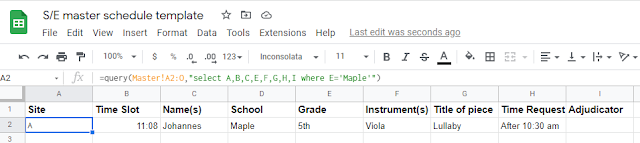


Here's what the formula looks like for the Site A tab:


For Site B, the last bit would say where A='B'").  I wanted the student's full name, not the first name for this tab, so up in the query line, I have "select A,B,D,E,F,G,H,I where A+'A'"--I skipped C, which is the column in the Master tab with the first name.


Once all that looks good, I do create separate Google Sheets schedules for each school's tab.  In a new Google Sheet, I copy/paste the formula down below into the A1 box.
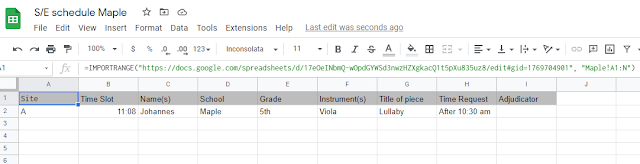


In the A1 box, here's what's inside: =IMPORTRANGE("https://docs.google.com/spreadsheets/d/1Eb3tXGMrsvrMWzRSdnb7tghBm9GpL2ouPDv8rk4HFp4/edit#gid=1276309528", "Maple!A1:N")

The http://.... is the URL of the Google Sheets master document.  After the , " is the name of the tab I want, in this case Maple.  This document auto-populates, and it automatically updates whenever something on the Google Sheets master document gets changed.  I make sure the column with the students' full names is hidden on this document, as I will change the sharing permissions to "Anyone with the link can view." and I'll share this one with families and post on our class Canvas page.  I also go to Format, Alternating colors to make this one easier to read.  This is the file I will print and post in the orchestra room too.

For the festival, I print off a copy of the one-page master document for myself and then copies of the schedules for each site to place outside each room and to put in each adjudicator's folder.  A copy of the schedule by school (and also by site) gets taped to the wall in the cafeteria, where students are warming up, so they can look if they need to check their time.

While I don't totally understand the formulas in Google Sheets, I can copy/paste from the previous year and make adjustments as needed to make sure everything is auto-populating as it should.  Please let me know if there are any steps I should clarify or provide screenshots of!

Monday, September 7, 2020

Prepping Folders for Fall 2020

Prepping folders fall 2020


 In preparation for in-person and virtual students in the fall and the possibility of going totally virtual at some point, I prepped folders with all the music/handouts students would need through winter break.  A local music store kindly donates folders each year.  I color-coded papers as I normally would so students can find sheets faster.  To ensure students would have a pencil (as I won't be leaving pencils on the stands for students to share throughout the day this year), I bought boxes of pencils, sharpened them, taped a piece of yarn to them, and taped them to the folder.  To the pockets of the folders, I taped in a "Contents" list and a fingering chart.


So far they're working out fine--and only a few students have totally dumped all the papers on the floor when they were pulling out the pencil.  Not quite sure how they managed that :)


Update: Now, a few years later, I'm also including concert dates and a reference sheet.  During the school year, I tape in the concert order for each of our concerts as well.  It takes quite a bit of prep time before school starts, but I am happy with the result :)


Prepping folders for fall 2020 plus fingering chart

Monday, August 24, 2020

Fingering Charts for Folders

Fingering reference chart violin viola cello bass


This fall I taped fingering charts into the folders for my students as a helpful reference for both my in-person and virtual students.  For second-year students, I included all the notes they should have learned last year and will be learning this year.  For first-year students, I included bubbles for the notes they will be learning this year so students can write them in as they learn them.


I used Finale to make the notes, using the Alpha note feature to add the letter name to the note head.  I made the bar lines and time signature invisible and played around with the spacing to get it to match the fingering chart above.  Then I took a screenshot and pasted that into Word.  For the fingering chart, I used Word and copy/pasted circles for the bubbles and text boxes without a border for the note names.  These just fit on the inside of a folder.  Feel free to edit to include the notes that you would like!


See also: Reference sheet for folders


Fingering reference chart violin viola cello bass


Fingering reference chart violin viola cello bass