Pages

Showing posts with label schedule. Show all posts

Monday, February 21, 2022

Elementary Orchestra Solo/Ensemble, Part 3: Creating the Schedule


For creating the Solo/Ensemble festival schedule, I use two documents.  One is the one-page master schedule which lets me see the entire schedule at a glance, and the other is the Google Sheets master schedule.  I had an administrator one year show me how to link different tabs (and even documents) to the master schedule so that they automatically update when I make a change on the master schedule tab.  I was so excited to learn about this--before then, I would email PDFs to families, but then once any updates were made (which inevitably happens), those PDFs are no longer current and I'd have to send out a new one.  Now families can access the link whenever they want and see the most up-to-date schedule.  I cannot thank him enough for showing this to me!!!  

The process of making the schedule takes a bit of preparation and time.  First I enter all the entries into the Google Sheets master document, using ? for any students in a registered student's ensemble who I haven't received a registration form yet.  I'll check in with those families individually the next week to see if they can participate or if I should delete their name from the schedule.  If any members of an ensemble are also doing a solo, I am sure to add those entries next so that they're all grouped together before I start assigning times.  

The different headings in the Google Sheets master schedule include Site, Time slot, Name(s) [first name only], Name(s) [full name], School, Grade, Title, Time Request, Adjudicator.  (I keep the Site, Time slot, and Adjudicator blank until I'm actually assigning times.)  I have the two separate columns for names because I'll use the full name on the schedules I post outside of the sites at the festival and to use mail-merge later on to create the rubrics and then the first name on the schedules I share with families to share privacy of the students a little bit (and hide the column with the full names).

To begin scheduling, I'll write in a few break times for adjudicators on the one-page master document, spacing them out so each adjudicator has their break during a different time slot.  This one-page master document has 5 sites with 8-minute time slots running from 8:00 am to 12:00 noon, so 30 time slots per adjudicator, 150 time slots total.


Then I start assigning times to those with time requests first, being sure to add their names to the one-page master schedule and then type the corresponding site and time on the Google Sheets master schedule.  Any students who are in more than one event get scheduled two or three slots away from their first time so that they don't have to be at the festival the entire morning.  I don't schedule them any closer than two or three slots away in case their first room is running late and their second room is running ahead of schedule.  I do want a little bit of a breather in-between for the student to regroup and focus on their next piece.

After the entries with time requests are scheduled (and any of those students' ensemble partners' solos), I look for students who are in more than one event and schedule them next, putting each of their events in different sites so they will get to work with more than one adjudicator.  If there are any ensembles where only one member can attend, I plan to play with that student as their ensemble partner and then am careful not to double-book myself during a particular time slot. 

Finally students who are only playing a solo, no ensemble, and have no time requests get entered last to fill in the spaces.  When it gets down to the last few, I'll count the number of events and empty slots for each adjudicator so I can even it out as best as I can.  Any super late registrations that come in after this point can get added to any empty slots until the schedule is filled.

Once the Google Sheets master schedule is completed, I go to Data, Sort range, then Advanced range sorting options. Be sure to check "Data has header row," then sort by "Time Slot" and then by "Site."  Now I can look through the other tabs that auto-populate to see the schedule for each site, and the entries for each school from the beginning of the day to the end.  I can't believe I used to do all those different sorts manually and then copy/paste into new tabs and then have to update all of those for any changes!  This function is a life saver! 


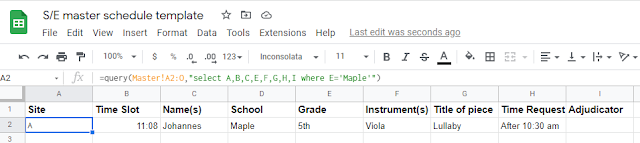
In this picture above of the Maple tab, I'm getting an error (where it says #N/A in A2) because in the query line, it says D='Maple', but in my master tab (below), the name of the school is really in column E, not D. 


Once I change D='Maple' to E='Maple' in that formula, the entry from the Master tab with "Maple" as the school auto-populates into the "Maple" tab.


Here's what the formula looks like for the Site A tab:


For Site B, the last bit would say where A='B'").  I wanted the student's full name, not the first name for this tab, so up in the query line, I have "select A,B,D,E,F,G,H,I where A+'A'"--I skipped C, which is the column in the Master tab with the first name.


Once all that looks good, I do create separate Google Sheets schedules for each school's tab.  In a new Google Sheet, I copy/paste the formula down below into the A1 box.
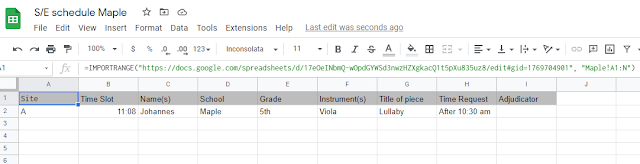


In the A1 box, here's what's inside: =IMPORTRANGE("https://docs.google.com/spreadsheets/d/1Eb3tXGMrsvrMWzRSdnb7tghBm9GpL2ouPDv8rk4HFp4/edit#gid=1276309528", "Maple!A1:N")

The http://.... is the URL of the Google Sheets master document.  After the , " is the name of the tab I want, in this case Maple.  This document auto-populates, and it automatically updates whenever something on the Google Sheets master document gets changed.  I make sure the column with the students' full names is hidden on this document, as I will change the sharing permissions to "Anyone with the link can view." and I'll share this one with families and post on our class Canvas page.  I also go to Format, Alternating colors to make this one easier to read.  This is the file I will print and post in the orchestra room too.

For the festival, I print off a copy of the one-page master document for myself and then copies of the schedules for each site to place outside each room and to put in each adjudicator's folder.  A copy of the schedule by school (and also by site) gets taped to the wall in the cafeteria, where students are warming up, so they can look if they need to check their time.

While I don't totally understand the formulas in Google Sheets, I can copy/paste from the previous year and make adjustments as needed to make sure everything is auto-populating as it should.  Please let me know if there are any steps I should clarify or provide screenshots of!

Monday, August 22, 2016

Small Group Learning--Creating a Rotating Schedule


Elementary orchestra sample small group instruction rotation schedule


My elementary orchestra students have their small group learning ("small groups") once a week for 30 minutes on a rotating basis.  Notice that this is called "small group learning" rather than "lessons."  The term "lessons" suggests one-on-one time with a private teacher, performance-based, outside the school day, and generally paid for by the student's family.  What I teach is a comprehensive musical education where students are composing, learning about history and culture, listening, writing, etc. as well as technique and musical literature.  The careful choice of "small groups" and not "lessons" helps to reflect what students are actually doing in orchestra and helps to validate orchestra as part of a well-rounded education.

Anyway, during my first year of teaching, I created a semester-long small group rotation and posted it outside the orchestra room and inside each classroom.  However, I quickly realized that field trips, school assemblies, standardized tests as well as simply getting to know the students better and changing enrollment meant that ongoing adjustments would need to be made.  I have since switched to posting a monthly schedule, which allows me more flexibility with scheduling around conflicts and modifying small group personnel as needed.

Students know to check the schedule each week to know when their small group time is that week, and at the end of the month, I simply post the new schedule.  Sometimes there are still last-minute changes such as when an assembly is scheduled after the monthly orchestra schedule has been posted or I find out about a field trip a few days before, but then I just pencil in the corrections.  I make sure that every student has a small group time each week, which means that some weeks have "combined small groups" to fit everyone in when a block of time is not open for orchestra that week.  Students get a kick out of the few times they have "giant small groups" with perhaps up to three groups scheduled at once.

These schedules can be tricky to visually decipher by students, so I intentionally label each group with a letter, spell out the month (instead of using numbers), include the day of the week, and then finally the time.  Otherwise, numbering the groups and referring to the month by its number results in a lot of numbers on the page and a bit of confusion on the part of the students.  At the beginning of the year, I coach students to check their small group letter first, then find the date, then read down to locate their small group letter and finally over to see what time they have orchestra.  My goal, of course, is for students to independently check the schedule each week and come at their scheduled time with the other students in their group.  I also cross out the day's column at the end of the day so it's easier to quickly find the current day next week.

When I figure out the rotations, instead of just moving each small group down to the next slot for the next week, I like to skip a couple of spots, usually three, so I can avoid having a student miss the same subject multiple weeks in a row.  Otherwise they may miss the first part of, say, math one week and the second part of math the next week.  Of course, sometimes this is unavoidable due to limitations of scheduling combined groups when standardized testing wipes out a few slots and then there's an assembly at the end of the day, but I do my best to keep the schedule rotating evenly.  Skipping a couple of spots also creates more variety for the students with regard to having morning or afternoon small groups rather than staying stuck on morning times for an entire month.


Things to include:
  • School/Grade level (name of ensemble)
  • Month
  • Upcoming concert dates and other important events
  • The table itself
  • Small group assignments (by letter and instrument)--list students' first names and homeroom teacher
  • Disclaimer that the schedule is subject to change and that students and teachers will be notified

I've also started including a picture of a composer whose birthday falls during the given month just as a way to visually differentiate between the old- and new-month's schedules and as another exposure for my students to composers.  I had been using clip art for each month, but I like the composer pictures for now.

I also color code each orchestra's schedule for easy identification by students and myself.  I teach two grade levels at two schools, and all my schedules, attendance sheets, and grade sheets are all color-coded by ensemble.  They are posted outside the orchestra room and at a designated location in each of the classrooms, which just takes a few minutes to change at the end of each month.  These are also posted on my school website as PDFs so families can access them from home, if desired.

Here is a totally generic sample small-group schedule that can be modified to match your teaching schedule:


Note: In recent years, I have switched to Google Docs for sharing small group schedules.  They are shared with families as view-only.  In this way, any updates I need to make mid-schedule can be viewed right away without having to print or post a new schedule.

I have been using a "master schedule" sort of planning document that has asterisks by students in advanced math classes and a corresponding asterisk for the time slot during that math class so I can be sure not to schedule those students then (or another symbol for students who I can't schedule during intervention time, for example).  But then, when I copy/paste that month's schedule into the running Google Doc for that particular orchestra, I go and delete all the special symbols so it's cleaner for students to look at and because they don't need to know all the behind-the-scenes details that I take into account with scheduling.

Enjoy!


Elementary orchestra sample small group instruction rotation schedule


Elementary orchestra sample small group instruction rotation schedule